Building an AdMob Earnings Dashboard for iOS: Google OAuth with PKCE, the AdMob Reporting API, Pacific-Time "Today", and Offline Caching
Signing in with ASWebAuthenticationSession and PKCE, storing tokens safely in the Keychain, calling networkReport:generate, decoding a streamed report, turning micros into money, why "today" is a Los Angeles day, live earning rates, and caching for offline use
If you have apps with ads, you know the habit: open the AdMob website on your phone, pinch, zoom, wait for the dashboard, then do it again an hour later. I wanted a native, fast, glanceable view of my AdMob earnings, so I built AdEarnings Pro. It's a dashboard for today's earnings, yesterday's comparison, earning rates per second, minute and hour, weekly averages for earnings and clicks, six months of history and currency conversion. It uses Google Sign-In, and the listing states plainly: "Your AdMob data is not saved, shared, or accessible to us."
That promise shapes the whole architecture. There's no server of mine in the middle. The app talks directly to Google's AdMob API using the user's own OAuth token, and everything is cached on the device.
This article walks through how to build that: OAuth for a native app done properly, the AdMob Reporting API's actual request and response format, and a few surprises from Google's documentation. The biggest is that the report time zone currently supports only America/Los_Angeles, which changes what "today" means for everyone outside California. Apple APIs are checked against Apple's documentation and Google APIs against Google's. Where I describe my approach rather than the shipped code, I say so.
1. The shape of the app: no middleman
The data flow is deliberately short:
- The user signs in with Google and grants a read-only reporting scope.
- The app stores the refresh token in the Keychain, on the device.
- The app calls
admob.googleapis.comdirectly with a short-lived access token. - Results are cached locally for offline viewing.
Google's AdMob API getting-started guide lists two scopes. admob.readonly lets an app "See all AdMob data", and Google notes that this "doesn't include sensitive data, such as payments or campaign details". admob.report lets it "See ad performance and earnings reports. See publisher ID, timezone, and default currency code." For an earnings dashboard, admob.report is the narrowest scope that works, and asking for the minimum is both good privacy and good for consent rates. Google's OAuth guide makes the same point: the fewer scopes you request, the more likely users are to grant them.
The listing also notes "This app requires access to your existing Google AdMob account". The API reads accounts; it can't create one.
2. OAuth for a native app: system browser, PKCE, no embedded web views
Google's OAuth documentation is blunt about embedded web views. Opening the authorization page in WKWebView produces a disallowed_useragent error, and Google recommends its Google Sign-In for iOS library or AppAuth instead. Both are built on the same standard flow: the system browser plus PKCE (Proof Key for Code Exchange). Here's that flow with Apple's own ASWebAuthenticationSession (iOS 12+), so you can see every step:
import AuthenticationServices
import UIKit
import CryptoKit
import Foundation

struct PKCE {
    let verifier: String
    let challenge: String

    /// Google: verifier is 43–128 chars of [A-Z a-z 0-9 - . _ ~]; S256 challenge = BASE64URL(SHA256(verifier)).
    static func make() -> PKCE {
        var bytes = [UInt8](repeating: 0, count: 32)
        _ = SecRandomCopyBytes(kSecRandomDefault, bytes.count, &bytes)
        let verifier = Data(bytes).base64URLEncoded()                     // 43 chars
        let challenge = Data(SHA256.hash(data: Data(verifier.utf8))).base64URLEncoded()
        return PKCE(verifier: verifier, challenge: challenge)
    }
}

extension Data {
    func base64URLEncoded() -> String {
        base64EncodedString().replacingOccurrences(of: "+", with: "-")
            .replacingOccurrences(of: "/", with: "_").replacingOccurrences(of: "=", with: "")
    }
}

@MainActor
final class GoogleAuth: NSObject, ASWebAuthenticationPresentationContextProviding {
    // An iOS OAuth client in Google Cloud; its redirect uses the reversed client ID as the scheme.
    let clientID = "1234-abc.apps.googleusercontent.com"
    var redirectScheme: String { "com.googleusercontent.apps.1234-abc" }
    var redirectURI: String { "\(redirectScheme):/oauth2redirect" }

    func signIn() async throws -> (code: String, pkce: PKCE) {
        let pkce = PKCE.make()
        let state = UUID().uuidString
        var url = URLComponents(string: "https://accounts.google.com/o/oauth2/v2/auth")!
        url.queryItems = [
            .init(name: "client_id", value: clientID),
            .init(name: "redirect_uri", value: redirectURI),
            .init(name: "response_type", value: "code"),
            .init(name: "scope", value: "https://www.googleapis.com/auth/admob.report"),
            .init(name: "code_challenge", value: pkce.challenge),
            .init(name: "code_challenge_method", value: "S256"),
            .init(name: "state", value: state)
        ]

        let callback: URL = try await withCheckedThrowingContinuation { cont in
            let session = ASWebAuthenticationSession(url: url.url!, callbackURLScheme: redirectScheme) { url, error in
                if let url { cont.resume(returning: url) } else { cont.resume(throwing: error ?? URLError(.cancelled)) }
            }
            session.presentationContextProvider = self
            session.prefersEphemeralWebBrowserSession = false   // reuse an existing Google session if there is one
            session.start()
        }

        let items = URLComponents(url: callback, resolvingAgainstBaseURL: false)?.queryItems ?? []
        guard items.first(where: { $0.name == "state" })?.value == state,       // CSRF check
              let code = items.first(where: { $0.name == "code" })?.value else { throw URLError(.userAuthenticationRequired) }
        return (code, pkce)
    }

    func presentationAnchor(for session: ASWebAuthenticationSession) -> ASPresentationAnchor {
        UIApplication.shared.connectedScenes.compactMap { ($0 as? UIWindowScene)?.keyWindow }.first ?? ASPresentationAnchor()
    }
}
Every parameter here comes from Google's OAuth documentation for installed apps:
- The authorization endpoint is
accounts.google.com/o/oauth2/v2/auth. response_type=codeis required.- The challenge is S256, which Google recommends.
- The verifier is 43 to 128 characters. Thirty-two random bytes, base64url-encoded, gives exactly 43.
stateprotects against cross-site request forgery. Google calls it out as important, and the code checks it.
On iOS 17.4 and later, ASWebAuthenticationSession also accepts a Callback object (ASWebAuthenticationSession.Callback). SwiftUI has a webAuthenticationSession environment value from iOS 16.4. Either is a tidier wrapper around the same flow.
3. Exchanging the code and keeping tokens safe
Next, swap the code for tokens at oauth2.googleapis.com/token, sending the PKCE verifier (not the challenge). Google's docs note that client_secret doesn't apply to iOS clients:
struct TokenResponse: Decodable {
    let access_token: String
    let expires_in: Int
    let refresh_token: String?
    let scope: String
}

extension GoogleAuth {
    func exchange(code: String, pkce: PKCE) async throws -> TokenResponse {
        try await tokenRequest([
            "client_id": clientID, "code": code, "code_verifier": pkce.verifier,
            "grant_type": "authorization_code", "redirect_uri": redirectURI
        ])
    }

    func refresh(using refreshToken: String) async throws -> TokenResponse {
        try await tokenRequest(["client_id": clientID, "grant_type": "refresh_token", "refresh_token": refreshToken])
    }

    private func tokenRequest(_ form: [String: String]) async throws -> TokenResponse {
        var request = URLRequest(url: URL(string: "https://oauth2.googleapis.com/token")!)
        request.httpMethod = "POST"
        request.setValue("application/x-www-form-urlencoded", forHTTPHeaderField: "Content-Type")
        var body = URLComponents(); body.queryItems = form.map { URLQueryItem(name: $0.key, value: $0.value) }
        request.httpBody = body.percentEncodedQuery?.data(using: .utf8)
        let (data, _) = try await URLSession.shared.data(for: request)
        return try JSONDecoder().decode(TokenResponse.self, from: data)
    }
}
Then store the refresh token in the Keychain, never in UserDefaults, and mark it device-only:
import Security

enum TokenVault {
    static let account = "admob.refresh"

    static func save(_ token: String) {
        let base: [String: Any] = [kSecClass as String: kSecClassGenericPassword,
                                   kSecAttrAccount as String: account]
        SecItemDelete(base as CFDictionary)
        var item = base
        item[kSecValueData as String] = Data(token.utf8)
        item[kSecAttrAccessible as String] = kSecAttrAccessibleAfterFirstUnlockThisDeviceOnly
        SecItemAdd(item as CFDictionary, nil)
    }
}
AfterFirstUnlockThisDeviceOnly lets a widget or a background refresh read the token after the first unlock, while keeping it out of backups and off other devices. Two of Google's notes are worth building in. First, check the returned scope: users can grant less than you asked for, and the app should explain what's missing. Second, there are limits on how many refresh tokens are issued per client and user, so keep and reuse the refresh token rather than signing in again each time.
"Revoke consent anytime" maps to two things. The user can remove access from their Google Account settings, and the app can call https://oauth2.googleapis.com/revoke?token=… on sign-out and then delete the Keychain item.
4. Asking AdMob for a report
The AdMob API's core endpoint is accounts.networkReport.generate, a POST to https://admob.googleapis.com/v1/accounts/{publisherId}/networkReport:generate with a reportSpec. Here's a request for daily earnings and clicks over the last seven days:
struct ReportDate: Codable { let year: Int, month: Int, day: Int }

struct NetworkReportRequest: Encodable {
    struct Spec: Encodable {
        struct Range: Encodable { let startDate: ReportDate; let endDate: ReportDate }
        struct Localization: Encodable { let currencyCode: String; let languageCode: String }
        let dateRange: Range
        let dimensions: [String]
        let metrics: [String]
        let localizationSettings: Localization
        let timeZone: String
    }
    let reportSpec: Spec
}

func weeklyRequest(endingOn end: ReportDate, start: ReportDate, currency: String) -> NetworkReportRequest {
    .init(reportSpec: .init(
        dateRange: .init(startDate: start, endDate: end),
        dimensions: ["DATE"],
        metrics: ["ESTIMATED_EARNINGS", "CLICKS", "IMPRESSIONS"],
        localizationSettings: .init(currencyCode: currency, languageCode: "en-US"),
        timeZone: "America/Los_Angeles"
    ))
}
Three facts from Google's reference page shape this request:
ESTIMATED_EARNINGSis in micros. "$6.50 would be represented as 6500000." Never put that number in aDoubleand divide casually; useDecimal.- Currency comes from
localizationSettings.currencyCode. Google says the currency unit of the earnings metrics is "determined by the localization setting for currency". The approach I'd use for "View earnings in your preferred currency" is to ask AdMob for that currency directly, so the figures are AdMob's own. - The time zone currently has only one supported value. Google: "Warning: The 'America/Los_Angeles' is the only supported value at the moment." Section 6 is about what that means.
5. Decoding a streamed report
The response isn't a simple object. It's "the result of a server-side streaming RPC": a JSON array whose first element has a header, then one row per result, then a footer. Each element has exactly one of those keys. So decode each element as an enum-like struct:
struct ReportChunk: Decodable {
    struct Row: Decodable {
        struct DimensionValue: Decodable { let value: String }
        struct MetricValue: Decodable { let microsValue: String?; let integerValue: String?; let doubleValue: Double? }
        let dimensionValues: [String: DimensionValue]
        let metricValues: [String: MetricValue]
    }
    let header: [String: AnyDecodable]?      // dateRange, localizationSettings
    let row: Row?
    let footer: [String: AnyDecodable]?      // matchingRowCount, warnings
}

struct AnyDecodable: Decodable { init(from decoder: Decoder) throws {} }   // we don't need header details here

struct DailyEarnings: Codable, Identifiable {
    var id: String { day }
    let day: String          // "20261022"
    let earnings: Decimal    // in report currency
    let clicks: Int
}

func parse(_ data: Data) throws -> [DailyEarnings] {
    try JSONDecoder().decode([ReportChunk].self, from: data).compactMap(\.row).map { row in
        let micros = Decimal(string: row.metricValues["ESTIMATED_EARNINGS"]?.microsValue ?? "0") ?? 0
        return DailyEarnings(day: row.dimensionValues["DATE"]?.value ?? "",
                             earnings: micros / 1_000_000,
                             clicks: Int(row.metricValues["CLICKS"]?.integerValue ?? "0") ?? 0)
    }
}
Google's example response shows "microsValue": 6500000 as a bare number. The API's JSON mapping for 64-bit integers often uses strings, so I'd decode both forms in production (a small custom init(from:)). The DATE dimension value is YYYYMMDD, as Google's reference describes.
Displaying money is then earnings.formatted(.currency(code: currency)). Don't hand-roll formats, because symbol placement and grouping vary by locale.
6. Why "today" is a Los Angeles day
Here's the subtle part. If reports can only be in America/Los_Angeles, then AdMob's "today" starts at midnight Pacific time. For me in India, that's 12:30 or 1:30 in the afternoon, depending on US daylight saving. A dashboard that labels the latest row "Today" without explanation will confuse anyone outside the Pacific time zone.
The approach I'd use is to compute "today" in the report's calendar and say so in the UI:
struct ReportCalendar {
    static let zone = TimeZone(identifier: "America/Los_Angeles")!
    static var calendar: Calendar { var c = Calendar(identifier: .gregorian); c.timeZone = zone; return c }

    static func reportDate(for date: Date = .now) -> ReportDate {
        let c = calendar.dateComponents([.year, .month, .day], from: date)
        return ReportDate(year: c.year!, month: c.month!, day: c.day!)
    }

    /// Seconds elapsed in the current *report* day; the denominator for live rates.
    static func secondsIntoReportDay(now: Date = .now) -> TimeInterval {
        now.timeIntervalSince(calendar.startOfDay(for: now))
    }
}
The live earning rates in the listing ("per second, minute, and hour") follow naturally. Today's earnings divided by seconds into the report day gives an average rate so far:
func rates(todayEarnings: Decimal, now: Date = .now) -> (perSecond: Decimal, perMinute: Decimal, perHour: Decimal) {
    let seconds = Decimal(max(ReportCalendar.secondsIntoReportDay(now: now), 60))   // avoid tiny denominators just after midnight
    let perSecond = todayEarnings / seconds
    return (perSecond, perSecond * 60, perSecond * 3600)
}
Label it honestly, as "average so far today". Ad revenue isn't evenly spread over a day, and AdMob's figures are estimated earnings that can be revised.
7. Pull to refresh, offline cache and the weekly view
"Pull-to-refresh for fresh data" is one modifier, refreshable (iOS 15+). "Offline-ready with cached data" means saving the last good response, with a timestamp, and showing it whenever the network fails:
import SwiftUI

@MainActor
final class Dashboard: ObservableObject {
    @Published private(set) var days: [DailyEarnings] = []
    @Published private(set) var updatedAt: Date?
    private let cacheURL = URL.cachesDirectory.appending(path: "report-week.json")

    init() {
        if let data = try? Data(contentsOf: cacheURL),
           let cached = try? JSONDecoder().decode(Cached.self, from: data) {
            days = cached.days; updatedAt = cached.at                   // instant first paint, even offline
        }
    }

    func refresh(using api: AdMobAPI) async {
        do {
            let fresh = try await api.lastSevenDays()
            days = fresh; updatedAt = .now
            try? JSONEncoder().encode(Cached(days: fresh, at: .now)).write(to: cacheURL, options: .atomic)
        } catch {
            // Keep showing the cache; the "Updated 2 h ago" label tells the user it's stale.
        }
    }

    var weeklyAverage: Decimal {
        days.isEmpty ? 0 : days.map(\.earnings).reduce(0, +) / Decimal(days.count)
    }

    private struct Cached: Codable { let days: [DailyEarnings]; let at: Date }
}

struct DashboardView: View {
    @StateObject private var model = Dashboard()
    let api: AdMobAPI
    var body: some View {
        List {
            if let updatedAt = model.updatedAt {
                Text("Updated \(updatedAt, format: .relative(presentation: .named))").font(.caption)
            }
            ForEach(model.days.reversed()) { day in
                LabeledContent(day.day, value: day.earnings, format: .currency(code: "USD"))
            }
        }
        .refreshable { await model.refresh(using: api) }
        .task { await model.refresh(using: api) }
    }
}
Putting the cache in Caches is deliberate. It's disposable, it's re-fetchable, and it holds only aggregated numbers from the user's own account on the user's own device. That fits the listing's privacy statement. (AdMobAPI here is the small wrapper around section 4's request, with a valid access token.)
8. Real-world example: AdEarnings Pro
This walkthrough comes from building AdEarnings Pro. The code above is the approach I'd use, written for this article, not a copy of the app's source.
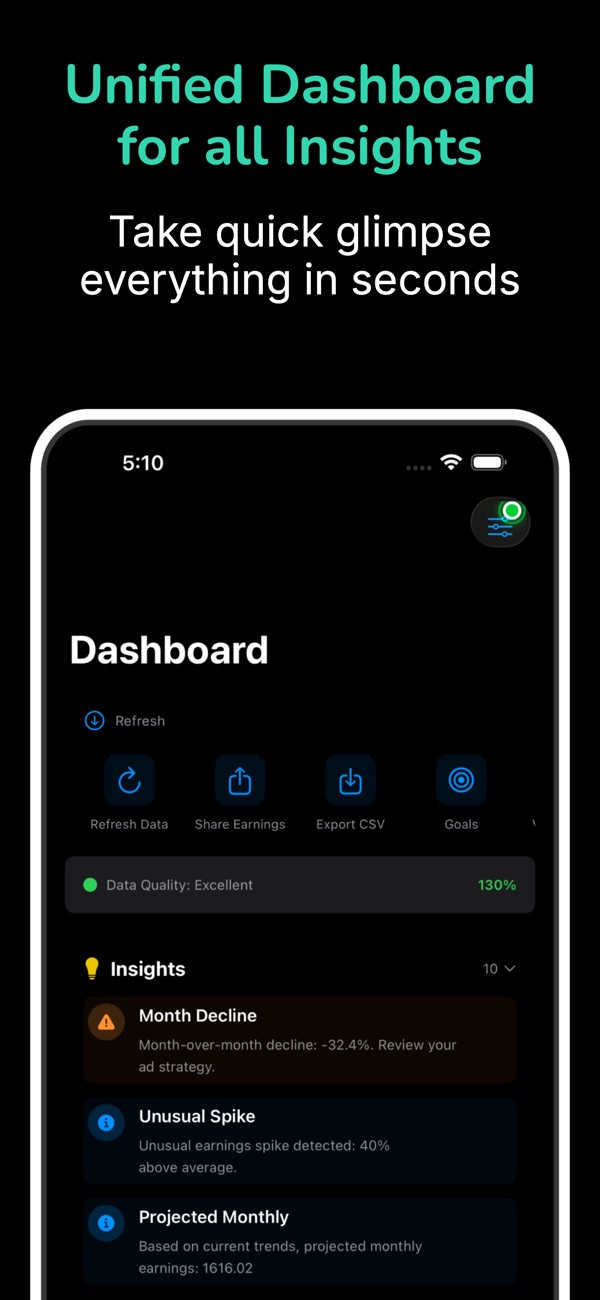
At the time of writing, its App Store listing shows:
- Free, in Developer Tools
- First released in November 2025
- No ratings yet in the US store
- Supports iOS 17.6 and later
How the listing maps to this article:
| What the listing says | Where it's covered |
|---|---|
| "Secure Google Sign-In authentication" / "Google OAuth authentication is required to access AdMob API services" | System-browser OAuth with PKCE, tokens in the Keychain (sections 2–3) |
| "Your AdMob data is not saved, shared, or accessible to us" | Direct device-to-Google calls, no middleman (section 1) |
| "View today's earnings with live updates. Compare yesterday's performance." | networkReport:generate with the DATE dimension (sections 4–5) |
| "Live earning rates per second, minute, and hour" | Rates over the Pacific report day (section 6) |
| "Weekly average trends for earnings and clicks" | ESTIMATED_EARNINGS and CLICKS (sections 4 and 7) |
| "Convert earnings to any currency…" | localizationSettings.currencyCode (section 4) |
| "Pull-to-refresh for fresh data" / "Offline-ready with cached data" | refreshable and a timestamped cache (section 7) |
| "Revoke consent anytime" | Google Account settings and the revoke endpoint (section 3) |
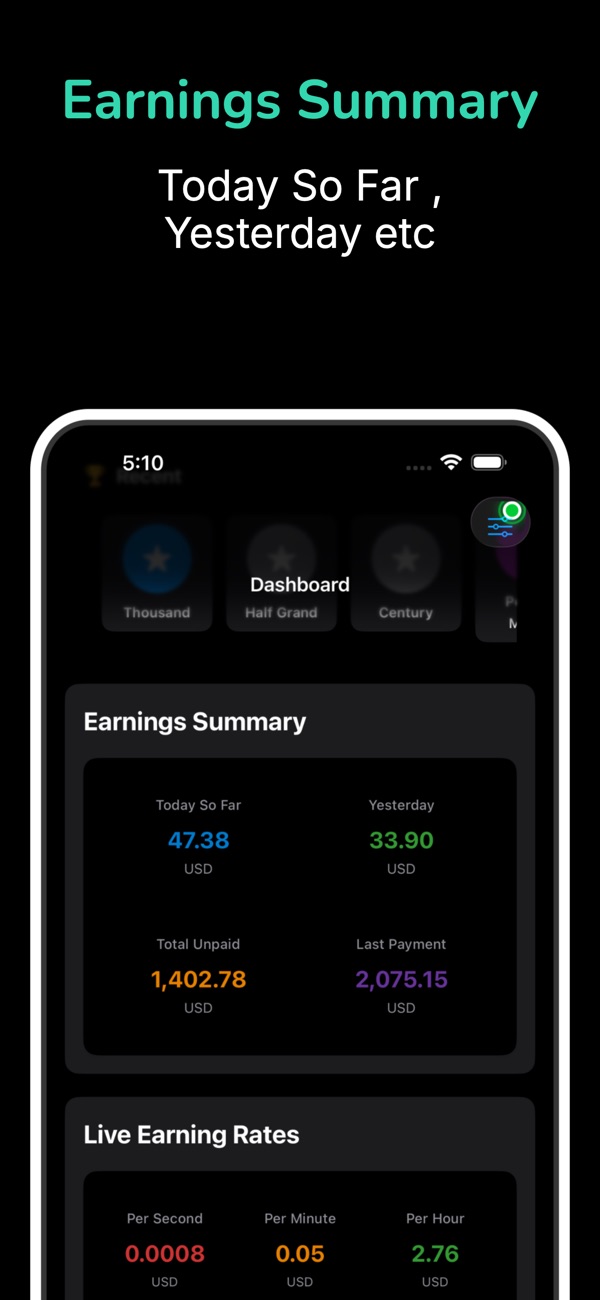
The listing also mentions unpaid earnings, last payment history and GDPR consent management. Those are outside this article's scope.
9. Before you ship an OAuth-powered dashboard: a checklist
- Use the narrowest scope that works, and check the granted
scopein the token response. - Use the system browser, PKCE (S256) and a
statecheck. NoWKWebViewfor sign-in. - Keep the refresh token in the Keychain, device-only, and reuse it.
- Sign-out revokes the token and clears the Keychain and caches.
- Handle money as
Decimalfrom micros, formatted with the currency's own format. - Make the report time zone explicit. "Today" is a Pacific day, and the UI says so.
- Label rates and estimates honestly: "average so far" and "estimated".
- Show cached data instantly, with a visible "Updated…" time.
- Complete Google's OAuth app verification if your scopes need it before public release. Google's docs describe an "unverified app" screen otherwise.
- No third-party analytics touches the earnings data.
Wrapping up
An earnings dashboard looks like a chart, but it's mostly about trust. Sign in the way Google and Apple both recommend, ask for the least access, keep tokens on the device, talk to the API directly, and be honest about what the numbers mean, including the surprising fact that AdMob's "today" is a Los Angeles day. Get those right, and a glance at your phone replaces a dozen trips to a desktop website.
Try the app, or explore my other work:
- AdEarnings Pro (iOS): https://apps.apple.com/us/app/adearnings-pro/id6754509445
- All of my free iOS apps: https://apps.apple.com/us/developer/alok-singh/id1508795536
- My portfolio: https://bestlatestapps.com/alok/
What's the one metric you check most in your ad dashboard? Tell me in the comments.
— Alok Kumar Singh