Building an Offline Quotes App in SwiftUI: a 50,000-Quote Library, a Daily Quote Without a Server, Honest Streaks and Share-as-Image
Bundling and importing a large library into SwiftData, picking a "quote of the day" deterministically, search with recent queries, collections, time-zone-safe streaks, rendering shareable quote cards with ImageRenderer, and Light/Dark/Auto themes

A quotes app looks like the simplest thing in the App Store: a list of text and a share button. Then you build one and the real questions show up. Where do 50,000 quotes live, and how do they get onto the phone without a slow first launch? How does every user get the same "quote of the day" without a server deciding it? What counts as a reading streak when someone flies from Delhi to San Francisco? And how do you turn a quote into an image that looks good on Instagram?
I've worked through those questions building Facts and Quotes, my app of curated quotes, motivational facts and wisdom. It has categories, offline access, search with recent searches, collections, reading streaks and achievements, sharing quotes as images or text, and Light, Dark and Auto themes.
This article walks through how I'd build each of those pieces in SwiftUI and SwiftData. Availability was checked against Apple's documentation. Where I describe an approach rather than the app's exact implementation, I say so.
1. Ship the library in the bundle, import it once
"Offline access, read anywhere" means the quotes ship with the app. A plain JSON file in the bundle is easy to produce, diff and validate. Decoding 50,000 small records is quick, but querying them is better done from a real store, so I'd import into SwiftData on first launch:
import SwiftData
import Foundation

@Model
final class Quote {
    @Attribute(.unique) var id: String
    var text: String
    var author: String
    var category: String
    var isFavorite: Bool = false
    var collections: [QuoteCollection] = []

    init(id: String, text: String, author: String, category: String) {
        self.id = id; self.text = text; self.author = author; self.category = category
    }
}

@Model
final class QuoteCollection {
    var name: String
    var createdAt: Date = Date.now
    @Relationship(inverse: \Quote.collections) var quotes: [Quote] = []
    init(name: String) { self.name = name }
}

struct QuoteRecord: Decodable { let id, text, author, category: String }
The import runs once, in the background, in batches, so memory stays flat and the UI never blocks:
@ModelActor
actor LibraryImporter {
    func importIfNeeded(bundleVersion: Int) throws {
        let key = "library.importedVersion"
        guard UserDefaults.standard.integer(forKey: key) < bundleVersion,
              let url = Bundle.main.url(forResource: "quotes", withExtension: "json") else { return }

        let records = try JSONDecoder().decode([QuoteRecord].self, from: Data(contentsOf: url))
        let existing = Set(try modelContext.fetch(FetchDescriptor<Quote>()).map(\.id))

        for (index, record) in records.enumerated() where !existing.contains(record.id) {
            modelContext.insert(Quote(id: record.id, text: record.text,
                                      author: record.author, category: record.category))
            if index % 2_000 == 0 { try modelContext.save() }   // batch saves
        }
        try modelContext.save()
        UserDefaults.standard.set(bundleVersion, forKey: key)
    }
}
Two design points:
- A library version number. When an app update adds quotes, bump the version and the importer adds only the new IDs. Favourites and collections are untouched because existing rows are never rewritten.
- Stable IDs. Give every quote a permanent ID in the source file. If you ever key on the text, fixing a typo would orphan a user's favourite.
For a "daily new quotes automatically updated" feature, the same importer can accept a small JSON file downloaded from your own server. The bundled library guarantees it still works offline on day one.
2. A quote of the day with no server
A "daily quote" should be the same all day, change at midnight and need no network. The trick is a deterministic pick from the local date:
import Foundation

enum DailyPick {
    /// Same answer for everyone on the same local calendar day.
    static func index(for date: Date = .now, count: Int, calendar: Calendar = .current) -> Int {
        guard count > 0 else { return 0 }
        let c = calendar.dateComponents([.year, .month, .day], from: date)
        let key = "\(c.year!)-\(c.month!)-\(c.day!)"
        return Int(stableHash(key) % UInt64(count))
    }

    /// FNV-1a: stable across launches and devices (unlike Swift's `hashValue`).
    static func stableHash(_ string: String) -> UInt64 {
        var hash: UInt64 = 0xcbf2_9ce4_8422_2325
        for byte in string.utf8 {
            hash ^= UInt64(byte)
            hash &*= 0x0000_0100_0000_01B3
        }
        return hash
    }
}
The gotcha worth a paragraph: don't use String.hashValue. Swift randomises hashing per process launch, so your "quote of the day" would change every time the app opened. Use a fixed algorithm like FNV-1a.
Then fetch by a sorted offset rather than loading everything:
func quoteOfTheDay(in context: ModelContext) throws -> Quote? {
    let total = try context.fetchCount(FetchDescriptor<Quote>())          // iOS 17+
    var descriptor = FetchDescriptor<Quote>(sortBy: [SortDescriptor(\.id)])
    descriptor.fetchOffset = DailyPick.index(count: total)
    descriptor.fetchLimit = 1
    return try context.fetch(descriptor).first
}
Sorting by the stable ID matters too. Without a sort order, "the 1,234th quote" isn't guaranteed to be the same row tomorrow.
3. Search across content, author and category, with recent searches
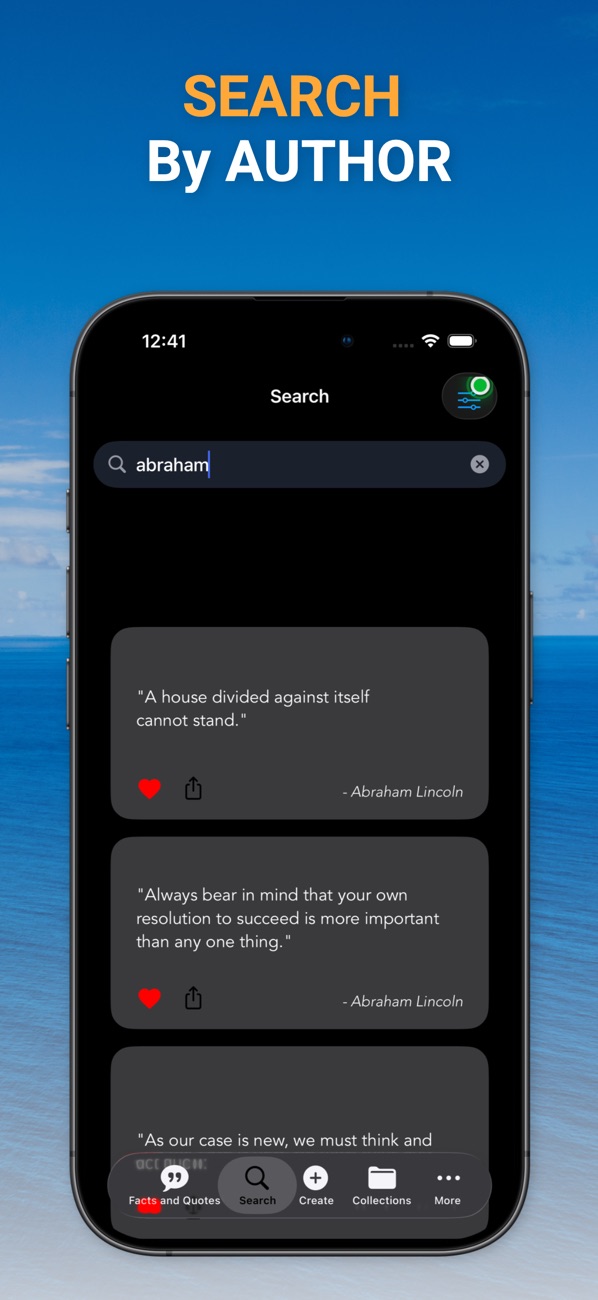
SwiftUI's searchable (iOS 16+) and SwiftData's #Predicate (iOS 17+) do most of the work. localizedStandardContains gives the case- and diacritic-insensitive matching people expect from a search box:
import SwiftUI
import SwiftData

struct SearchView: View {
    @State private var text = ""
    @AppStorage("recentSearches") private var recentData = Data()

    var body: some View {
        NavigationStack {
            QuoteResults(query: text)
                .navigationTitle("Search")
                .searchable(text: $text, prompt: "Quotes, authors, categories")
                .searchSuggestions {
                    if text.isEmpty {
                        ForEach(recent, id: \.self) { term in
                            Text(term).searchCompletion(term)
                        }
                    }
                }
                .onSubmit(of: .search) { remember(text) }
        }
    }

    private var recent: [String] { (try? JSONDecoder().decode([String].self, from: recentData)) ?? [] }

    private func remember(_ term: String) {
        let trimmed = term.trimmingCharacters(in: .whitespaces)
        guard !trimmed.isEmpty else { return }
        let updated = ([trimmed] + recent.filter { $0.caseInsensitiveCompare(trimmed) != .orderedSame }).prefix(8)
        recentData = (try? JSONEncoder().encode(Array(updated))) ?? Data()
    }
}

struct QuoteResults: View {
    @Query private var quotes: [Quote]

    init(query: String) {
        let q = query
        _quotes = Query(filter: #Predicate<Quote> {
            q.isEmpty ||
            $0.text.localizedStandardContains(q) ||
            $0.author.localizedStandardContains(q) ||
            $0.category.localizedStandardContains(q)
        }, sort: \Quote.author)
    }

    var body: some View {
        List(quotes) { quote in
            VStack(alignment: .leading, spacing: 4) {
                Text("“\(quote.text)”")
                Text("— \(quote.author)").font(.caption).foregroundStyle(.secondary)
            }
        }
    }
}
Rebuilding the Query in the child view's initialiser is the standard way to drive a dynamic predicate from parent state. Recent searches are small and per-device, so @AppStorage is the right home for them.
4. Collections and favourites
With the many-to-many relationship from section 1, collections are a few lines. Favourites are just a flag. The listing says the Favorites collection "automatically syncs your liked quotes", so I'd treat it as a virtual collection, a query, rather than a stored one that can drift out of sync:
struct FavoritesView: View {
    @Query(filter: #Predicate<Quote> { $0.isFavorite }, sort: \Quote.author)
    private var favorites: [Quote]

    var body: some View {
        List(favorites) { Text($0.text) }
            .overlay { if favorites.isEmpty { ContentUnavailableView("No favourites yet", systemImage: "heart") } }
    }
}

func add(_ quote: Quote, to collection: QuoteCollection) {
    guard !collection.quotes.contains(where: { $0.id == quote.id }) else { return }
    collection.quotes.append(quote)
}
Deleting a collection shouldn't delete its quotes. The default delete rule for a relationship, nullify, does exactly that.
5. Streaks that survive time zones
A streak is "the number of consecutive days, ending today, on which you read". The bugs come from storing timestamps and doing arithmetic in seconds. Then 23:50 and 00:10 count as the same day, or a flight makes a day disappear.
The fix is to store calendar days as the user experienced them, as plain date strings, and count backwards:
import Foundation

struct StreakTracker {
    private(set) var days: Set<String>          // "2026-10-22", in the user's local calendar at the time
    var calendar = Calendar.current

    private func key(_ date: Date) -> String {
        let c = calendar.dateComponents([.year, .month, .day], from: date)
        return String(format: "%04d-%02d-%02d", c.year!, c.month!, c.day!)
    }

    mutating func recordRead(at date: Date = .now) { days.insert(key(date)) }

    func currentStreak(asOf now: Date = .now) -> Int {
        var day = calendar.startOfDay(for: now)
        // Not read yet today? The streak can still be alive from yesterday.
        if !days.contains(key(day)) {
            day = calendar.date(byAdding: .day, value: -1, to: day)!
        }
        var count = 0
        while days.contains(key(day)) {
            count += 1
            day = calendar.date(byAdding: .day, value: -1, to: day)!
        }
        return count
    }
}
Why this is honest:
- Each day is recorded in the local calendar at the moment it happens. Reading at 23:55 in Delhi is "the 22nd", whatever happens afterwards.
- Today doesn't break the streak until it's over. Opening the app at 8 a.m. shouldn't show zero because you haven't read yet.
- Calendar arithmetic, not 86,400-second arithmetic.
date(byAdding: .day…)handles daylight-saving days of 23 or 25 hours.
Achievements, like "7-day streak" or "read 100 quotes", are then pure functions of this data. Compute them; don't store them separately.
6. Share as a beautiful image
"Share quotes as beautiful images or text" is two lines of SwiftUI once you have the pieces: ImageRenderer (iOS 16+) to rasterise a SwiftUI view, and ShareLink with a Transferable item (iOS 16+):
import SwiftUI

struct QuoteCard: View {
    let quote: Quote
    var body: some View {
        VStack(alignment: .leading, spacing: 20) {
            Text("“\(quote.text)”").font(.system(size: 44, weight: .semibold, design: .serif))
            Text("— \(quote.author)").font(.title2).foregroundStyle(.white.opacity(0.8))
        }
        .foregroundStyle(.white)
        .padding(80)
        .frame(width: 1080, height: 1350)                        // a 4:5 portrait post
        .background(LinearGradient(colors: [.indigo, .purple], startPoint: .topLeading, endPoint: .bottomTrailing))
    }
}

struct ShareableQuote: Transferable {
    let quote: Quote
    static var transferRepresentation: some TransferRepresentation {
        DataRepresentation(exportedContentType: .png) { item in
            await MainActor.run {
                let renderer = ImageRenderer(content: QuoteCard(quote: item.quote))
                renderer.scale = 1                                // the view is already 1080 px wide
                return renderer.uiImage?.pngData() ?? Data()
            }
        }
        ProxyRepresentation { "“\($0.quote.text)” — \($0.quote.author)" }   // text fallback
    }
}

struct ShareButton: View {
    let quote: Quote
    var body: some View {
        ShareLink(item: ShareableQuote(quote: quote),
                  preview: SharePreview("Quote by \(quote.author)")) {
            Label("Share", systemImage: "square.and.arrow.up")
        }
    }
}
Details that matter:
- Design the card at output pixel size and render with
scale = 1. Sizes stay predictable, and text is sharp at the size social apps actually use. - Offer text too. The
ProxyRepresentationgives the share sheet a plain-text version, so Messages or Notes receive words, not a picture of words. - Rendering happens on the main actor.
ImageRendereris main-actor bound, hence theMainActor.run.
7. Light, Dark and Auto, with colour tokens
"Light, Dark, and Auto" is a three-way setting where Auto means "follow the system". In SwiftUI, preferredColorScheme(nil) is exactly that:
enum ThemeSetting: String, CaseIterable { case auto, light, dark
    var scheme: ColorScheme? { switch self { case .auto: nil; case .light: .light; case .dark: .dark } }
}

@main
struct QuotesApp: App {
    @AppStorage("theme") private var theme = ThemeSetting.auto
    var body: some Scene {
        WindowGroup {
            RootView().preferredColorScheme(theme.scheme)
        }
        .modelContainer(for: [Quote.self, QuoteCollection.self])
    }
}
The listing mentions a design system with 50+ colour tokens. The approach I'd use is to define each token once in the asset catalog with light and dark variants, and refer to it by meaning (Color("surfaceElevated"), Color("textSecondary")) rather than by hue. Then a theme change is free, and no screen hard-codes .black.
8. Real-world example: Facts and Quotes
All of this comes from building Facts and Quotes. The code above is the approach I'd use, written for this article, not a copy of the app's source.
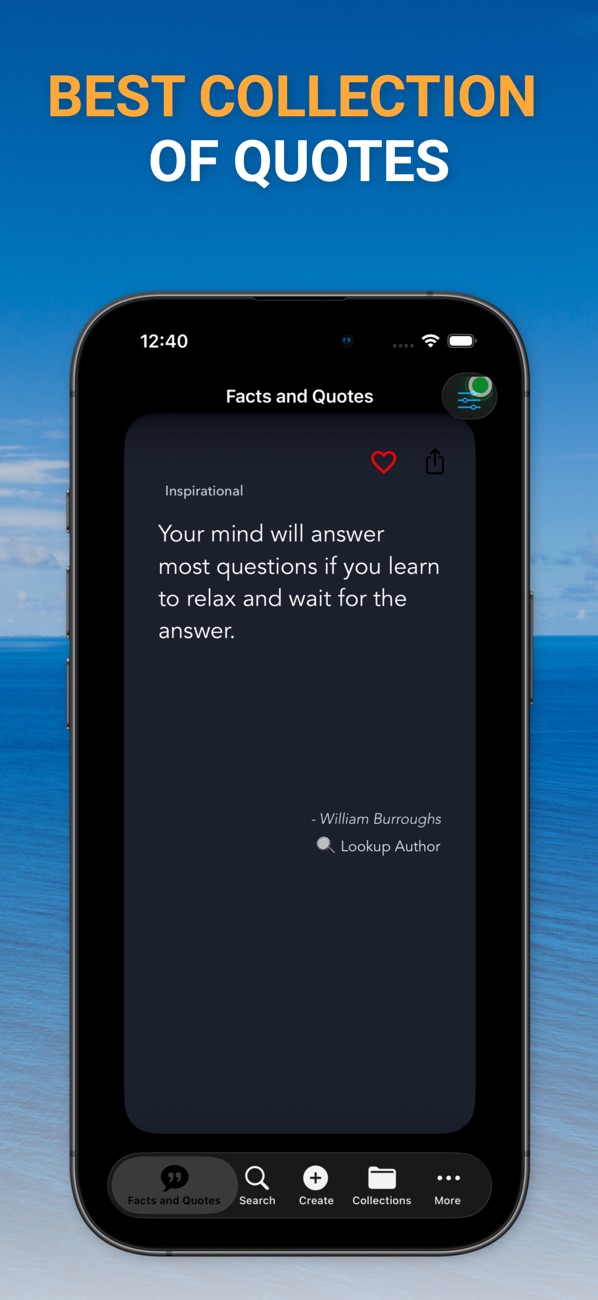
At the time of writing, its App Store listing shows:
- Free, in Health & Fitness and Productivity
- First released in August 2022
- 3 ratings in the US store, all 5 stars
- Supports iOS 17.6 and later
How the listing maps to this article:
| What the listing says | Where it's covered |
|---|---|
| "50,000+ curated quotes", "Offline access - read anywhere, anytime" | Bundled library imported into SwiftData (section 1) |
| "Daily new quotes automatically updated" | Versioned importer plus a deterministic daily pick (sections 1–2) |
| "Search quotes by content, author, or category" / "Recent searches" | searchable + #Predicate + searchSuggestions (section 3) |
| "Create custom collections…" / "Favorites collection automatically syncs your liked quotes" | SwiftData relationships and a query-based Favorites (section 4) |
| "Track your reading streak and daily progress" / "Unlock achievements" | Calendar-day streaks (section 5) |
| "Share quotes as beautiful images or text" | ImageRenderer + Transferable + ShareLink (section 6) |
| "Light, Dark, and Auto theme support" / "50+ color tokens" | preferredColorScheme and semantic colours (section 7) |
The listing also mentions AI-powered recommendations and haptic feedback. Those are topics for their own articles. I've written about haptics separately, in my Haptics Explorer piece.
9. Before you ship a content app: a checklist
- The first launch is fast. The import runs in the background, in batches, and the UI shows today's quote immediately.
- Every item has a stable ID. Updates never break favourites or collections.
- The daily pick uses a stable hash. No
hashValue, and the fetch has a fixed sort order. - Search is case- and accent-insensitive, and recent searches are capped.
- Streaks are tested across midnight, daylight saving and a time-zone change.
- Shared images are rendered at their target pixel size, with a text fallback.
- Auto theme follows the system; no colour is hard-coded.
- Attribution is correct. Every quote has an author, or "Unknown". Misattributed quotes are the most common complaint in this category.
- Accessibility. Quote text scales with Dynamic Type, and VoiceOver reads the author after the quote.
Wrapping up
The app is simple to use because the hard parts are hidden. Ship content offline and import it once. Make "daily" deterministic. Store days, not seconds. Render share images at their real size. None of it needs a server, which is also why the app works on a plane.
Try the app, or explore my other work:
- Facts and Quotes (iOS): https://apps.apple.com/us/app/facts-and-quotes/id1607878544
- All of my free iOS apps: https://apps.apple.com/us/developer/alok-singh/id1508795536
- My portfolio: https://bestlatestapps.com/alok/
Got a favourite quote? Drop it in the comments.
— Alok Kumar Singh