The Device Side of APNs: Building a Push Notification Test Client in Swift
Permission, registration, device tokens, foreground presentation and payload inspection, plus the exact HTTP/2 request your backend needs to send
Every backend developer who has implemented Apple push notifications knows this moment. The server code is written and the request goes out. APNs answers 200, and nothing appears on the phone. Or APNs answers 400 BadDeviceToken, and you have no idea whether the problem is your token, your certificate, your environment or your JSON.
The hard part is that the backend developer usually doesn't own the iOS app. They have to ask the mobile team for a build, a device token and the right certificate, and then wait again every time something changes.
That's why I built Push Notification – Client, a small iPhone app with one job: be a known-good receiver. It hands you a device token, a bundle identifier and a certificate, so you can point your server code at it and see exactly what arrives. It's been on the App Store since June 2020 and is one of my more popular developer tools.
This article covers both halves of that loop. First, the device side: what an iOS app has to do to receive a push, written so you can build your own test client. Then the server side: the exact request APNs expects, and the error codes you'll see when it's wrong. I've checked API names, header names and limits against Apple's documentation.
1. How a push actually travels
It helps to have the whole picture before writing code:
┌──────────┐ 1. register  ┌──────┐
│ iOS app  │─────────────▶│ APNs │
│          │◀─────────────│      │ 2. device token
└────┬─────┘              └──▲───┘
     │ 3. send token           │ 5. HTTP/2 POST /3/device/<token>
     ▼                         │    (cert or JWT, topic = bundle ID)
┌──────────────────────────────┴──┐
│ Your provider server            │ 4. store token
└─────────────────────────────────┘
               6. APNs delivers to the device → system shows it / app handles it
Three identities have to line up for delivery to work:
- The app's bundle ID is the APNs topic.
- The environment. A development build gets a sandbox token; an App Store or TestFlight build gets a production token. Tokens aren't interchangeable.
- The credential. A push certificate for that bundle ID, or a token-signing key from the same team.
Most "it doesn't arrive" bugs are one of these three not matching. A test client makes all three visible.
2. Capabilities and permission
In Xcode, add the Push Notifications capability. This adds the aps-environment entitlement, whose value (development or production) is set by your signing. If you want to test silent pushes too, add Background Modes → Remote notifications.
Then ask for permission. UNUserNotificationCenter.requestAuthorization(options:) (iOS 10+) has an async form:
import UserNotifications
import UIKit

enum PushPermission {
    /// Returns true if the user allowed alerts, sounds or badges.
    @MainActor
    static func request() async -> Bool {
        let center = UNUserNotificationCenter.current()
        do {
            let granted = try await center.requestAuthorization(options: [.alert, .sound, .badge])
            // Register even if denied: you still get a token,
            // and silent (background) pushes don't need alert permission.
            UIApplication.shared.registerForRemoteNotifications()
            return granted
        } catch {
            print("Authorization request failed: \(error)")
            return false
        }
    }

    static func currentStatus() async -> UNAuthorizationStatus {
        await UNUserNotificationCenter.current().notificationSettings().authorizationStatus
    }
}
Two details people often miss:
- Registering and authorising are separate.
registerForRemoteNotifications()gets you a device token whether or not the user allows alerts. Permission decides only how a push is shown. - Provisional authorisation (
.provisional, iOS 12+) delivers quietly to Notification Center without prompting. For a test tool I want the real prompt, because I want the full alert, but provisional is worth knowing about for consumer apps.
3. Getting and showing the device token
APNs returns the token to your app delegate as raw Data. Servers expect a lowercase hex string. Getting this conversion wrong (for example, using description on the Data) is the classic cause of BadDeviceToken.
In a SwiftUI app you wire the app delegate in with @UIApplicationDelegateAdaptor (iOS 14+):
import SwiftUI
import UserNotifications

@MainActor
final class PushModel: ObservableObject {
    static let shared = PushModel()
    @Published var deviceToken: String?
    @Published var registrationError: String?
    @Published var received: [ReceivedPush] = []
}

struct ReceivedPush: Identifiable {
    let id = UUID()
    let date = Date()
    let json: String
}

final class AppDelegate: NSObject, UIApplicationDelegate, UNUserNotificationCenterDelegate {

    func application(_ application: UIApplication,
                     didFinishLaunchingWithOptions launchOptions: [UIApplication.LaunchOptionsKey: Any]? = nil) -> Bool {
        UNUserNotificationCenter.current().delegate = self
        return true
    }

    func application(_ application: UIApplication,
                     didRegisterForRemoteNotificationsWithDeviceToken deviceToken: Data) {
        let hex = deviceToken.map { String(format: "%02x", $0) }.joined()
        Task { @MainActor in PushModel.shared.deviceToken = hex }
    }

    func application(_ application: UIApplication,
                     didFailToRegisterForRemoteNotificationsWithError error: Error) {
        // Common on the Simulator without a configured environment,
        // or when the entitlement is missing.
        Task { @MainActor in PushModel.shared.registrationError = error.localizedDescription }
    }
}

@main
struct PushClientApp: App {
    @UIApplicationDelegateAdaptor(AppDelegate.self) private var appDelegate

    var body: some Scene {
        WindowGroup { ContentView().environmentObject(PushModel.shared) }
    }
}
The token screen should make the token trivially easy to get off the phone: a big monospaced label, a Copy button (UIPasteboard.general.string = token) and a Share button (ShareLink(item: token)). Show the bundle ID next to it (Bundle.main.bundleIdentifier), plus a clear label for the environment this build uses, because the person on the other end will need all three.
One more rule: treat the token as changeable. The system can issue a new one, for example after a restore to a new device. Real apps send it to their server on every launch, not only the first.
4. Seeing pushes while the app is open
By default, if your app is in the foreground when a push arrives, iOS doesn't show a banner. For a test client that's backwards: the user is staring at the app, waiting for the push. Implement userNotificationCenter(_:willPresent:withCompletionHandler:) and ask for a banner anyway. While you're there, capture the payload so you can show it.
extension AppDelegate {

    // Foreground delivery: show it AND log it.
    func userNotificationCenter(_ center: UNUserNotificationCenter,
                                willPresent notification: UNNotification,
                                withCompletionHandler completionHandler:
                                    @escaping (UNNotificationPresentationOptions) -> Void) {
        log(notification.request.content.userInfo)
        completionHandler([.banner, .list, .sound, .badge])
    }

    // The user tapped a notification (app was in background or not running).
    func userNotificationCenter(_ center: UNUserNotificationCenter,
                                didReceive response: UNNotificationResponse,
                                withCompletionHandler completionHandler: @escaping () -> Void) {
        log(response.notification.request.content.userInfo)
        completionHandler()
    }

    // Silent pushes ("content-available": 1) arrive here, if Background Modes allows it.
    func application(_ application: UIApplication,
                     didReceiveRemoteNotification userInfo: [AnyHashable: Any],
                     fetchCompletionHandler completionHandler:
                        @escaping (UIBackgroundFetchResult) -> Void) {
        log(userInfo)
        completionHandler(.newData)
    }

    private func log(_ userInfo: [AnyHashable: Any]) {
        // userInfo is the decoded JSON payload. Re-serialise it so you see exactly what arrived.
        let dict = Dictionary(uniqueKeysWithValues: userInfo.map { ("\($0.key)", $0.value) })
        let data = (try? JSONSerialization.data(withJSONObject: dict,
                                                options: [.prettyPrinted, .sortedKeys])) ?? Data()
        let json = String(decoding: data, as: UTF8.self)
        Task { @MainActor in PushModel.shared.received.insert(ReceivedPush(json: json), at: 0) }
    }
}
.banner and .list are iOS 14+. They replaced the older .alert option.
Showing the raw JSON is the single most useful debugging feature in a test client. Half the "my custom data didn't arrive" bugs turn out to be a backend nesting a key inside aps that belongs outside it, or the other way round.
5. Payload anatomy, and the limits that bite
A push payload is a JSON dictionary with an aps key for Apple-defined fields. Your own data goes alongside aps, never inside it:
{
  "aps": {
    "alert": { "title": "Order shipped", "body": "Your parcel is on its way." },
    "sound": "default",
    "badge": 1,
    "thread-id": "orders",
    "interruption-level": "active"
  },
  "orderId": "A-1042"
}
The fields I test most often:
alert: a string, or a dictionary withtitle,subtitleandbody.content-available: 1: a background (silent) push. Apple's docs say to omitalert,badgeandsoundfor a silent update, and to send it withapns-push-type: backgroundandapns-priority: 5.mutable-content: 1: sends the push through your Notification Service Extension (UNNotificationServiceExtension, iOS 10+) before it's shown. This is how you attach images or decrypt content.interruption-level:passive,active,time-sensitiveorcritical. Time-sensitive needs its own capability; critical needs an entitlement from Apple.
And the hard limit: 4 KB (4,096 bytes) for a normal remote notification (VoIP pushes get 5 KB). Over that, APNs answers 413 PayloadTooLarge. Push an ID and fetch the details; don't push the whole document.
6. The other half: what your server sends
Here's the request in its plainest form. APNs uses HTTP/2 over TLS 1.2 or later, at api.sandbox.push.apple.com (development) or api.push.apple.com (production), on port 443 (or 2197).
With a certificate (the listing's flow: use the device token, bundle ID and certificate from the app), curl is enough to prove the pipeline end to end:
TOKEN=<hex device token from the app>
TOPIC=<bundle id shown in the app>

curl -v --http2 \
  --cert-type P12 --cert ./push-cert.p12:<p12-password> \
  -H "apns-topic: ${TOPIC}" \
  -H "apns-push-type: alert" \
  -H "apns-priority: 10" \
  -d '{"aps":{"alert":{"title":"Hello","body":"From curl"},"sound":"default"}}' \
  "https://api.sandbox.push.apple.com/3/device/${TOKEN}"
With token-based auth, you sign a short JWT with your .p8 key instead. Apple's docs require ES256, a 10-character key ID (kid) and your team ID (iss). Refresh the token no more than once every 20 minutes and no less than once every 60. In Python, with PyJWT and httpx[http2]:
import time, jwt, httpx

TEAM_ID, KEY_ID = "ABCDE12345", "FGHIJ67890"
P8 = open("AuthKey_FGHIJ67890.p8").read()

def provider_token() -> str:
    # Cache this and reuse it for ~30-50 minutes; don't mint one per request.
    return jwt.encode({"iss": TEAM_ID, "iat": int(time.time())}, P8,
                      algorithm="ES256", headers={"kid": KEY_ID})

def send(device_token: str, topic: str, payload: dict, sandbox: bool = True):
    host = "api.sandbox.push.apple.com" if sandbox else "api.push.apple.com"
    with httpx.Client(http2=True) as client:
        r = client.post(f"https://{host}/3/device/{device_token}", json=payload, headers={
            "authorization": f"bearer {provider_token()}",
            "apns-topic": topic,
            "apns-push-type": "alert",
            "apns-priority": "10",
        })
    print(r.status_code, r.headers.get("apns-id"), r.text)
The app's listing includes guidance and code examples for Java, Go, Python, Ruby, Erlang and Node.js. The shape is the same in every language: an HTTP/2 POST to /3/device/<token>, the topic header, the push-type header, and either a client certificate or a bearer token.
7. Reading APNs errors like a checklist
When it fails, APNs tells you why, in a JSON body with a reason. These are the ones I see most, straight from Apple's response table:
| Status | reason |
What it usually means |
|---|---|---|
| 400 | BadDeviceToken |
Token is malformed, or doesn't match the environment (sandbox token sent to production, or vice versa) |
| 400 | DeviceTokenNotForTopic |
The token belongs to a different bundle ID than your apns-topic |
| 400 | TopicDisallowed / BadTopic |
The topic isn't one your credential may push to |
| 403 | BadCertificateEnvironment |
Development certificate against the production host, or the reverse |
| 403 | ExpiredProviderToken / InvalidProviderToken |
JWT too old (over an hour), or signed with the wrong key, key ID or team |
| 410 | Unregistered / ExpiredToken |
The token is no longer active: stop sending to it |
| 413 | PayloadTooLarge |
Over 4 KB |
| 429 | TooManyRequests |
Too many pushes to the same token; back off |
Apple's docs are explicit that you shouldn't retry BadDeviceToken, DeviceTokenNotForTopic, Forbidden, ExpiredToken, Unregistered or PayloadTooLarge; only TooManyRequests is worth retrying after a delay. And a 200 means APNs accepted the push, not that the device displayed it. That's precisely the gap a test client closes.
8. Real-world example: Push Notification – Client
This is what Push Notification – Client is for. The code above is the approach I'd use to build any receiver like it; I'm describing the technique rather than publishing the app's source.
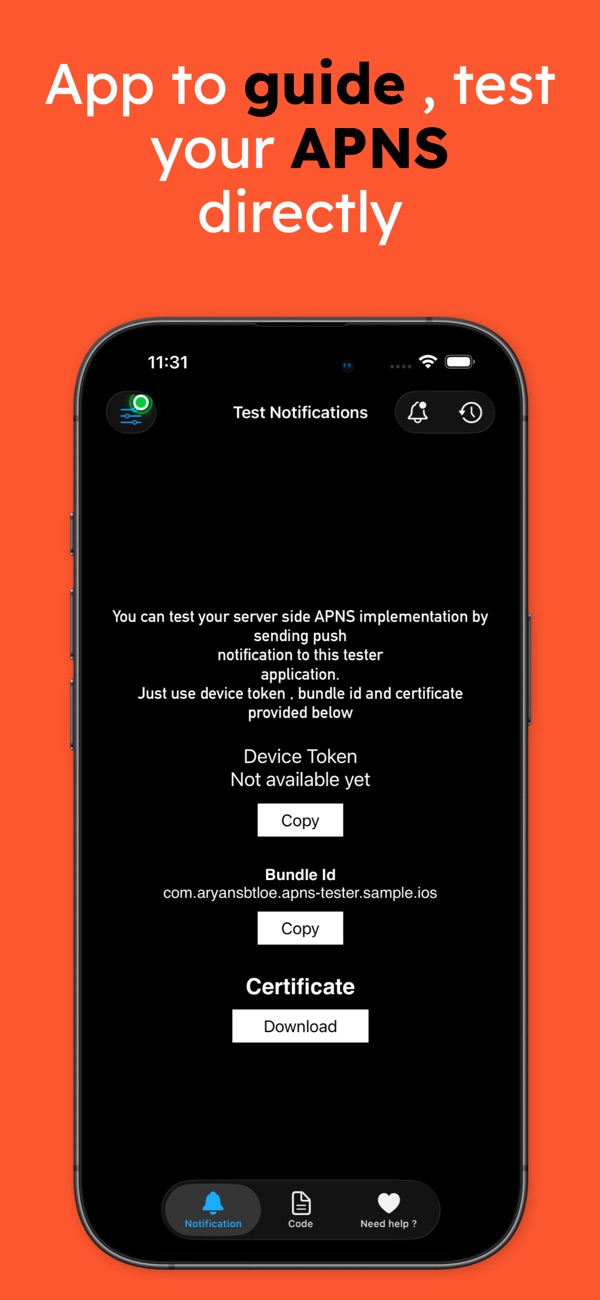
At the time of writing, its App Store listing shows:
- Free, in Developer Tools and Utilities
- First released in June 2020
- 58 ratings in the US store, averaging about 4.1 stars
- Supports iOS 17.6 and later
The listing describes it in one line: "Test your server-side APNS implementation by sending push notifications to this testing app." Mapping that to the sections above:
| What the listing says | Where it's covered |
|---|---|
| "Simply use the device token, bundle identifier, and certificate provided through the app" | Token capture and display (section 3), the three identities (section 1), certificate-based curl (section 6) |
| "Guidelines with code examples… Java, Go, Python, Ruby, Erlang, Node.js" | The request shape in section 6, which is identical across languages |
| "Perfect for backend and server-side developers… who want to test their code" | Foreground presentation and raw-payload logging (section 4), the error table (section 7) |
It has a sibling on the Mac: Push Notification – Tester sends APNs pushes from your Mac using a certificate from Keychain, with no server at all. Between the two you can test both ends of the pipe. I'm writing up the Mac side, Keychain identities and client-certificate auth in URLSession, as a separate article.
9. Before you ship push notifications: a checklist
- The capability and entitlement are present in every target that needs them, and your build's
aps-environmentmatches the APNs host your server uses. - The token is hex-encoded correctly, sent to your server on every launch, and replaced when it changes.
- Foreground behaviour is deliberate.
willPresentreturns the options you actually want; don't leave it to the default. - Custom data sits outside
aps, and the whole payload is comfortably under 4 KB. - Silent pushes are silent.
content-available: 1, no alert, badge or sound,apns-push-type: background, priority 5. Don't rely on them for anything critical; the system may throttle them. - Server credentials are rotated safely. JWTs are cached and refreshed every 20–60 minutes; certificates have a calendar reminder before they expire.
- Errors drive cleanup. On
410 Unregistered, delete the token. OnBadDeviceToken, check the environment before blaming the token. - You've tested on a real device in both environments: a development build and a TestFlight build.
Wrapping up
Push notifications are a three-party protocol, and when it breaks the problem is usually a mismatched identity, not your code. Build the device side once, properly: permission, registration, a correctly encoded token, foreground presentation and raw-payload logging. The server side then becomes a single, well-understood HTTP/2 request with a readable error table.
If you'd rather skip building the receiver, the apps are free:
- Push Notification – Client (iOS): https://apps.apple.com/us/app/push-notification-client/id1516378834
- Push Notification – Tester (Mac): https://apps.apple.com/us/app/push-notification-tester/id1516154713
- All of my free apps: https://apps.apple.com/us/developer/alok-singh/id1508795536
- My portfolio: https://bestlatestapps.com/alok/
What's the strangest APNs bug you've chased? The one I hear about most is a perfectly valid sandbox token sent to the production host. Tell me yours in the comments.
— Alok Kumar Singh