The Sending Side of APNs: A Mac Push Tester with Keychain Certificates, URLSession Client Auth and HTTP/2
Finding push certificates in the Keychain, importing .p12 files, answering APNs's client-certificate challenge in URLSession, building the exact request (path, headers, payload), sandbox vs production, silent pushes, and reading APNs's error responses, all without a server
In my article on Push Notification – Client, I covered the device side of APNs: permission, registration, device tokens and showing what arrives. This is the other end of the pipe.
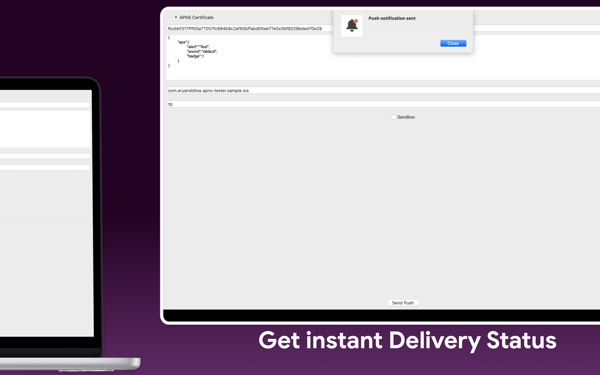
When you're building push notifications, the slowest part of the loop is often the sending side. The backend isn't ready. Or it's owned by another team, or every test means deploying a change to a server just to see whether a payload renders. Push Notification – Tester is my Mac app for skipping all of that. You choose a push certificate from Keychain, paste a device token, write a JSON payload, pick Development (sandbox) or Production, and send. There's no server dependency.
This article shows how a tool like that works under the hood. It's all standard Apple API: the Security framework to find identities, URLSession to authenticate with a client certificate over HTTP/2, and Apple's documented APNs request format. The protocol facts are taken from Apple's APNs documentation. Where I describe how I'd build something rather than the shipped app, I say so.
1. Two ways to authenticate with APNs, and why a tester uses certificates
APNs accepts two kinds of provider authentication:
- Token-based (a
.p8signing key): you sign a short-lived JWT and send it in anauthorization: bearer …header. One key works for all your apps. - Certificate-based (a push certificate, often exported as
.p12): the TLS connection itself proves who you are, using a client certificate.
Apple's docs show both. For a desktop testing tool, certificates have a practical advantage: developers already have them in their Keychain, and the whole authentication step happens in the TLS handshake. Nothing needs to be signed per request.
One consequence, straight from Apple's documentation of the request headers: the authorization: bearer <provider_token> header is for token auth only, and "APNs ignores this header if you use certificate-based authentication." apns-topic is still required: "In general, the topic is your app's bundle ID/app ID." Keep the two modes clearly separate in your code.
2. Finding push identities in the Keychain
An identity in Keychain terms is a certificate plus its private key, which is what TLS client auth needs. SecItemCopyMatching with kSecClassIdentity lists them. I'd filter to push certificates by their subject summary, which for APNs certificates names the push service and your bundle ID:
import Security
import Foundation

struct PushIdentity: Identifiable, Hashable {
    let id: String              // subject summary, also used as the display name
    let identity: SecIdentity
    var isProbablyPush: Bool { id.localizedCaseInsensitiveContains("Push") }
}

enum KeychainIdentities {
    static func all() -> [PushIdentity] {
        let query: [String: Any] = [
            kSecClass as String: kSecClassIdentity,
            kSecReturnRef as String: true,
            kSecMatchLimit as String: kSecMatchLimitAll
        ]
        var result: CFTypeRef?
        guard SecItemCopyMatching(query as CFDictionary, &result) == errSecSuccess,
              let identities = result as? [SecIdentity] else { return [] }

        return identities.compactMap { identity in
            var cert: SecCertificate?
            guard SecIdentityCopyCertificate(identity, &cert) == errSecSuccess, let cert,
                  let summary = SecCertificateCopySubjectSummary(cert) as String? else { return nil }
            return PushIdentity(id: summary, identity: identity)
        }
        .sorted { ($0.isProbablyPush ? 0 : 1, $0.id) < ($1.isProbablyPush ? 0 : 1, $1.id) }
    }
}
Sorting push certificates to the top and keeping the others is deliberate. Names vary by certificate type and era, and a tester that hides the one certificate you need is worse than one that shows a few extras.
3. Importing a .p12 file
The listing mentions ".p12 / .pem workflows". For a .p12 (PKCS #12), the Security framework does the parsing. SecPKCS12Import returns the identity inside, given the export password:
enum P12Import {
    enum Failure: Error { case wrongPassword, noIdentity, status(OSStatus) }

    static func identity(from data: Data, password: String) throws -> SecIdentity {
        let options = [kSecImportExportPassphrase as String: password] as CFDictionary
        var items: CFArray?
        let status = SecPKCS12Import(data as CFData, options, &items)
        switch status {
        case errSecSuccess: break
        case errSecAuthFailed: throw Failure.wrongPassword
        default: throw Failure.status(status)
        }
        guard let first = (items as? [[String: Any]])?.first,
              let identity = first[kSecImportItemIdentity as String] else { throw Failure.noIdentity }
        return identity as! SecIdentity      // CF type bridging: the dictionary value is a SecIdentity
    }
}
A clear "wrong password" message matters more than it looks. It's by far the most common failure when importing a .p12, and a generic error code makes people think the certificate itself is broken.
.pem files hold the certificate and key as text. The approach I'd recommend is to convert them to .p12 with openssl pkcs12 -export and import that. The import path then stays the same either way.
4. Answering the client-certificate challenge in URLSession
When URLSession connects to APNs, the server asks for a client certificate. You answer in a delegate method by building a URLCredential from the identity:
import Foundation

final class APNsClient: NSObject, URLSessionDelegate {
    private let identity: SecIdentity
    private lazy var session = URLSession(configuration: .ephemeral, delegate: self, delegateQueue: nil)

    init(identity: SecIdentity) { self.identity = identity }

    func urlSession(_ session: URLSession, didReceive challenge: URLAuthenticationChallenge,
                    completionHandler: @escaping (URLSession.AuthChallengeDisposition, URLCredential?) -> Void) {
        switch challenge.protectionSpace.authenticationMethod {
        case NSURLAuthenticationMethodClientCertificate:
            let credential = URLCredential(identity: identity, certificates: nil, persistence: .forSession)
            completionHandler(.useCredential, credential)
        default:
            // Server trust etc.: let the system evaluate Apple's certificate normally.
            completionHandler(.performDefaultHandling, nil)
        }
    }
}
Two notes:
- Use a session-level delegate. The client-certificate challenge is a connection-level challenge, delivered to
urlSession(_:didReceive:completionHandler:). There's also a task-level variant; implement the session one at minimum. - Don't override server trust.
.performDefaultHandlingfor everything else means the system still validates Apple's server certificate. A testing tool is no excuse to disable TLS validation.
URLSession negotiates HTTP/2 automatically with servers that support it, and APNs requires HTTP/2 and TLS 1.2 or later. You don't need a custom HTTP/2 library.
5. Building the request: path, headers, payload
Apple's documentation spells out the request precisely: a POST to /3/device/<device token> on one of two hosts. I'd model it directly:
enum APNsEnvironment: String, CaseIterable {
    case development, production
    var host: String {
        switch self {
        case .development: "api.sandbox.push.apple.com"
        case .production:  "api.push.apple.com"
        }
    }
}

enum PushType: String, CaseIterable { case alert, background }

struct PushRequest {
    var environment: APNsEnvironment
    var deviceToken: String
    var topic: String                 // usually your bundle ID
    var pushType: PushType
    var payloadJSON: String

    func urlRequest() throws -> URLRequest {
        let token = deviceToken.filter(\.isHexDigit).lowercased()   // tolerate pasted spaces and <>
        var request = URLRequest(url: URL(string: "https://\(environment.host)/3/device/\(token)")!)
        request.httpMethod = "POST"
        request.setValue(topic, forHTTPHeaderField: "apns-topic")
        request.setValue(pushType.rawValue, forHTTPHeaderField: "apns-push-type")
        request.setValue(pushType == .background ? "5" : "10", forHTTPHeaderField: "apns-priority")
        request.setValue(UUID().uuidString.lowercased(), forHTTPHeaderField: "apns-id")

        let body = Data(payloadJSON.utf8)
        _ = try JSONSerialization.jsonObject(with: body)          // fail fast on invalid JSON
        guard body.count <= 4096 else { throw PushError.payloadTooLarge(body.count) }
        request.httpBody = body
        return request
    }
}

enum PushError: Error { case payloadTooLarge(Int) }
Each line maps to Apple's documentation:
- Hosts.
api.sandbox.push.apple.comis the development server andapi.push.apple.comis production. A device token from a debug build only works against the sandbox, which is the single most common "my push never arrives" cause. apns-push-type. It must "accurately reflect the contents of your notification's payload". It's required for watchOS and recommended for iOS, macOS, tvOS and iPadOS.- Payload size. Apple's docs say it's limited to "a maximum size of 4 KB (4096 bytes)", and must not be compressed. Checking it locally saves a round trip and a
413response. apns-id. It's optional, but setting your own UUID makes it easy to match a response to a request in your log.
6. Alerts, badges, sounds and silent pushes
The listing promises "Custom JSON payloads for alerts, badges, sounds, and silent content". I'd offer templates for each, since the shape of aps is where most mistakes happen:
enum PayloadTemplate: String, CaseIterable {
    case alert, badge, sound, silent

    var json: String {
        switch self {
        case .alert:  #"{ "aps": { "alert": { "title": "Hello", "body": "From my Mac" } } }"#
        case .badge:  #"{ "aps": { "badge": 3 } }"#
        case .sound:  #"{ "aps": { "alert": "Ding", "sound": "default" } }"#
        case .silent: #"{ "aps": { "content-available": 1 }, "refresh": "inbox" }"#
        }
    }
    var pushType: PushType { self == .silent ? .background : .alert }
}
The silent template follows Apple's "Pushing background updates to your app" guide: the aps dictionary contains only content-available, with custom keys alongside it, and the request uses apns-push-type: background with apns-priority: 5. The same guide warns that the system treats background notifications as low priority and "doesn't guarantee their delivery", and may throttle them. A tester should say that in the UI, so nobody spends an afternoon debugging a throttled silent push.
7. Sending, and reading APNs's answer
APNs replies with an HTTP status and, on failure, a small JSON body with a reason. Surfacing that reason verbatim is the most useful thing a tester does:
extension APNsClient {
    struct Outcome { let status: Int; let apnsID: String?; let reason: String? }

    func send(_ push: PushRequest) async throws -> Outcome {
        let (data, response) = try await session.data(for: try push.urlRequest())
        let http = response as! HTTPURLResponse
        let reason = (try? JSONSerialization.jsonObject(with: data) as? [String: Any])?["reason"] as? String
        return Outcome(status: http.statusCode,
                       apnsID: http.value(forHTTPHeaderField: "apns-id"),
                       reason: reason)
    }
}
And a human explanation for the common reasons, taken from Apple's "Handling notification responses from APNs":
| Status / reason | What it means in practice |
|---|---|
200 |
Accepted by APNs. Delivery to the device is a separate step. |
400 BadDeviceToken |
The token is invalid. Usually a sandbox token sent to production, or the reverse; Apple says to check "that the token matches the environment". |
403 BadCertificate / BadCertificateEnvironment |
The certificate is invalid, or doesn't match the server you chose. |
410 Unregistered / ExpiredToken |
"The device token is inactive for the specified topic", or has expired. Typically the app was deleted or the token changed; stop sending to it. |
413 PayloadTooLarge |
Over 4 KB. |
429 TooManyRequests |
Too many pushes to the same token. Apple says you can retry with a delay. |
Apple's guidance is explicit that you shouldn't retry BadDeviceToken, DeviceTokenNotForTopic, Forbidden, ExpiredToken, Unregistered or PayloadTooLarge. A tester can turn that into a "fix this first" hint instead of a Retry button.
8. Real-world example: Push Notification - Tester
This is the approach behind Push Notification - Tester. The code above is written for this article, not the app's source.
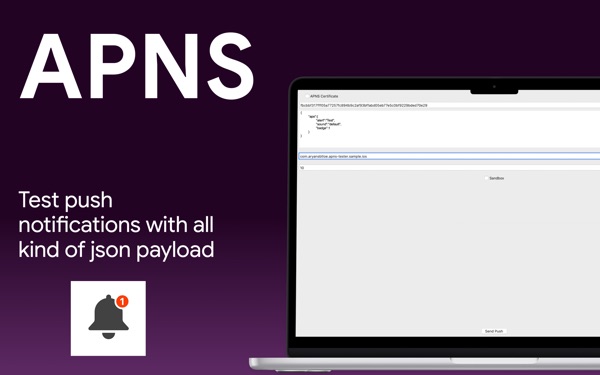
At the time of writing, its Mac App Store listing shows:
- Free, in Developer Tools
- First released in June 2020
- No ratings yet in the US store
- Requires macOS 14.6 or later
How the listing maps to this article:
| What the listing says | Where it's covered |
|---|---|
| "Select the push certificate directly from Keychain (.p12 / .pem workflows)" | Keychain identities and PKCS #12 import (sections 2–3) |
| "Send APNs pushes from your Mac with no server dependency" | URLSession client-certificate auth over HTTP/2 (section 4) |
| "Paste any device token and send in seconds" | Token clean-up and the request path (section 5) |
| "Target Development (sandbox) or Production environments" | The two APNs hosts (section 5) |
| "Custom JSON payloads for alerts, badges, sounds, and silent content" | Payload templates and silent-push rules (section 6) |
| "Perfect for verifying device tokens, validating certificates…" | Reading APNs's status and reason (section 7) |
Pair it with its iOS sibling, Push Notification – Client, which shows the device token to paste and displays what arrives. Between the two, you can test both ends without a backend.
9. Before you trust a push test: a checklist
- The environment matches the build. Debug and development builds use the sandbox; TestFlight and App Store builds use production.
- The topic is the bundle ID the certificate was issued for.
apns-push-typematches the payload:alertfor visible pushes,background(priority 5) for silent ones.- The payload is valid JSON, under 4,096 bytes, and not compressed.
- Server trust is never disabled. Only answer the client-certificate challenge.
- The
reasonstring is read, and non-retryable errors aren't retried. - Silent pushes aren't expected to be guaranteed. Throttling is normal.
- Certificates expire. Check the expiry date when you pick an identity.
- For production backends, consider token-based (
.p8) auth. Certificates are handy for testing, but tokens don't need yearly renewal.
Wrapping up
Sending a push is less magic than it seems: an identity from the Keychain, a credential in a URLSession delegate, and a POST to /3/device/<token> with four headers and a small JSON body. A good tester makes each step visible and turns APNs's terse reasons into plain advice, so the next time a push "doesn't arrive", you know within a minute whether it's the token, the environment, the certificate or the payload.
Try the app, or explore my other work:
- Push Notification - Tester (Mac): https://apps.apple.com/us/app/push-notification-tester/id1516154713
- Push Notification – Client (iOS): https://apps.apple.com/us/app/push-notification-client/id1516378834
- All of my apps: https://apps.apple.com/us/developer/alok-singh/id1508795536
- My portfolio: https://bestlatestapps.com/alok/
What's the strangest push-delivery bug you've chased? Share it in the comments.
— Alok Kumar Singh